

Why are you still paying a premium monthly subscription just to copy and paste your private data into a chat box? It's a fragmented workflow that forces you to choose between modern productivity and data sovereignty. You've likely felt the friction of jumping between Microsoft Word and an AI interface, all while wondering if your sensitive documents are training a model you don't own. Most professionals are tired of the "middleman" tax and the lack of transparency in how their information is handled.
This guide changes that dynamic by introducing you to the next generation of the ai powered docx editor. You'll learn how to integrate your own API keys directly into your document workflow, ensuring that your data stays private and your costs remain under your direct control. We'll explore how to handle .docx files natively in your browser with zero data training on your personal files. By the end of this article, you'll have a clear roadmap for building a secure, high-performance writing environment that respects your intelligence and your wallet.
Key Takeaways
- Understand how an ai powered docx editor moves beyond simple text generation to perform complex document refactoring and translation natively.
- Discover the Bring Your Own Key (BYOK) model to maintain absolute ownership of your data while eliminating redundant monthly subscription fees.
- Learn to use AI-integrated sidebars for precise, non-intrusive editing that preserves your original document structure.
- Master techniques for restructuring passive drafts into professional, active prose using targeted AI prompts.
- Transition to a minimalist, browser-based workflow that prioritizes privacy and local data handling for all your .docx files.
What is an AI Powered DOCX Editor?
An ai powered docx editor serves as a bridge between large language models and native document formatting. It embeds intelligence directly into the interface where you already work. Instead of treating a document as a static container for text, these editors treat it as a dynamic data structure. You don't have to leave your workspace to refine a paragraph or restructure a technical report. This integration removes the friction of copy-pasting between a browser tab and your local files, keeping your focus on the content.
Standard cloud editors often treat AI as an afterthought or a plugin that sits on top of the text. This creates a disconnect between the AI's output and the document's actual layout. Professional editors solve this by making the AI aware of the .docx schema. This ensures that when you refactor a section, your headings, font styles, and margins remain intact. It is about maintaining the integrity of professional work while leveraging the speed of automation.
The Evolution of Word Processing in 2026
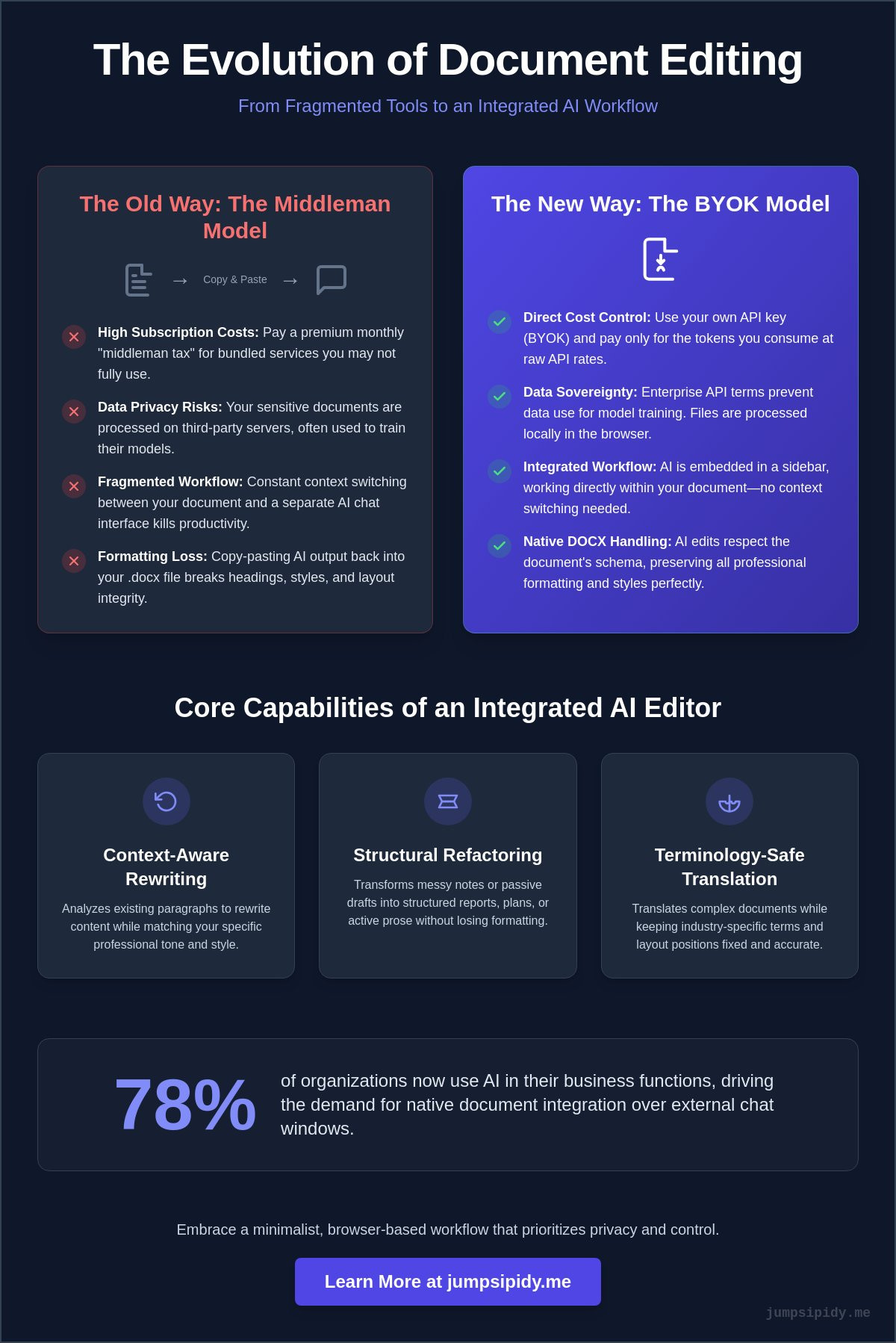
By 2026, document creation has shifted from simple data entry to a collaborative process between users and AI agents. With 78% of organizations now using AI in their business functions, the demand for native document integration has surpassed the utility of external chat windows. Traditional word processors were built for a pre-AI era. They often struggle with the complex XML structures of .docx files when external scripts try to modify them. Modern tools now prioritize browser-based native handling. This allows for real-time collaborative editing without the heavy overhead of legacy software suites. You get the speed of a web app with the precision of a professional desktop editor.
Core Capabilities of Modern AI Editors
The best tools in this category move beyond simple text generation. While some platforms claim to generate instant 15-page reports, they often ignore the need for precision editing of existing professional documents. A professional ai powered docx editor focuses on surgical accuracy and technical integrity. You gain the ability to refactor existing content without starting from scratch. These tools enable a variety of high-level tasks:
- Context-Aware Rewriting: The system analyzes your existing paragraphs to match your specific professional tone.
- Structural Refactoring: Turn messy meeting notes into structured project plans without losing the underlying .docx formatting.
- Terminology-Safe Translation: Translate complex documents into other languages while keeping industry-specific terms and layout positions fixed.
This approach puts you in the driver's seat. You aren't just a passive recipient of AI content. You act as an editor-in-chief, using the AI to handle the heavy lifting of restructuring and formatting while you maintain final authority over the narrative. It is a utility-first approach that respects your time and your data.
The BYOK Advantage: Why Your Own API Key Matters
Most AI writing platforms operate as intermediaries. They purchase AI tokens at wholesale prices, package them in a proprietary interface, and charge users a significant markup through flat monthly fees. This model creates a "subscription tax" where you pay for capacity you may never use. A Bring Your Own Key (BYOK) model shifts this power back to you. By connecting an ai powered docx editor directly to providers like OpenAI, Anthropic, or Google, you pay only for the exact number of tokens you consume at raw API rates.
This approach treats the editor as a high-performance tool rather than a restrictive service. It unbundles the software interface from the underlying intelligence. You aren't locked into a single provider's roadmap or pricing structure. Instead, you maintain a modular workflow where you can swap out the backend as the market evolves. This level of autonomy is essential for professionals who require transparency and cost efficiency in their technical stack.
Privacy and Data Sovereignty
Data ownership is a primary concern for anyone handling sensitive business or legal documents. When you use a consumer-facing chat interface, your data often becomes fodder for future model training. Using your own API key changes the legal relationship between you and the model provider. Enterprise API terms generally prohibit providers from using your inputs to train their public models. This active mitigation of AI privacy risks ensures that client confidentiality remains intact.
Browser-based editing further enhances this security. Modern editors can process files locally in your browser memory rather than uploading them to a third-party cloud server for permanent storage. Your documents stay under your control. This setup is particularly effective for those who must maintain strict compliance standards while benefiting from AI assistance. If you want to experience this level of control without an upfront cost, you can start with a DOCX FREE EDITOR that supports direct API integration.
Customizing Your AI Experience
The BYOK model allows for granular control over your creative process. Different tasks require different models. You might use Claude 3.5 Sonnet for its nuanced prose during a first draft, then switch to GPT-4o for technical refactoring or data extraction. An ai powered docx editor with BYOK capabilities allows you to toggle these models instantly within the same document interface.
Budget management becomes a transparent process rather than a guessing game. You can set strict usage limits within your provider's dashboard to ensure you never exceed your allocated spend. This future-proofs your workflow. As new, more efficient models are released, you can adopt them immediately without waiting for a software vendor to update their platform. You remain the architect of your own digital environment, choosing the tools that best fit your specific needs and budget.
Evaluating AI Integration: Sidebars vs. Full Automation
Choosing the right integration model for your ai powered docx editor depends on your specific output requirements. Some platforms prioritize full automation, attempting to generate entire documents from a single prompt. While this approach is fast, it often results in generic content that requires extensive manual correction to meet professional standards. A more balanced approach utilizes an integrated sidebar, allowing for surgical precision while maintaining the human-in-the-loop. This ensures that the final document reflects your expertise rather than a machine's best guess.
| Feature | AI Sidebar Integration | Full Document Automation |
|---|---|---|
| User Control | High: Edit segment by segment | Low: AI dictates the structure |
| Production Speed | Moderate: Best for refinement | High: Best for first drafts |
| Technical Accuracy | High: Human verifies every change | Moderate: Risk of generic "hallucinations" |
The AI Sidebar Workflow
A sidebar interface transforms your ai powered docx editor into a precision instrument. By highlighting specific text segments, you can trigger targeted rewriting, tone adjustments, or data extraction without affecting the rest of the document. This method preserves the "What You See Is What You Get" (WYSIWYG) experience, ensuring that your native .docx formatting remains undisturbed. You can also use the sidebar for document-wide analysis, such as generating executive summaries or identifying inconsistent terminology across a fifty-page report. It stays out of the way until you need it, acting as a sophisticated technical partner.
When to Use Document Generation
Full document generation is most effective when you face the "blank page" problem. It excels at rapidly prototyping standard operating procedures (SOPs), business plans, or initial project outlines. Use AI to build the scaffolding of your document, then transition to a sidebar for fine-tuning. However, purely AI-generated layouts often lack the visual hierarchy required for professional reports. Utilizing pre-built Document Templates provides a superior structural foundation compared to raw AI output. A template ensures your margins, headers, and branding are perfect, while the AI focuses on filling those sections with relevant, high-quality content. This hybrid approach combines the speed of automation with the reliability of established professional standards.
Best Practices for AI-Assisted Document Restructuring
Before you engage an ai powered docx editor, define your document's core objective. A technical white paper requires a different refactoring strategy than a marketing brief. Many tools focus on creating content from nothing, but professional utility lies in refining what already exists. Start by identifying the primary audience. This ensures your prompts for restructuring remain aligned with the final goal. Use the AI to analyze your existing draft for logical consistency before you begin major edits.
AI excels at refactoring passive voice into active, professional prose. Passive constructions often obscure accountability and slow down the reader. Prompt the editor to identify these instances and suggest direct alternatives. This maintains a sense of momentum in your writing. For long-form documents, leverage the AI to perform consistency checks across multiple sections. It can flag if a technical term is defined differently in the introduction than in the conclusion, ensuring a unified professional voice.
Refactoring a 10-page document requires a methodical approach. Follow these steps to ensure technical integrity using an integrated sidebar:
- Import and Analyze: Load your .docx file and use the sidebar to generate a high-level summary of the current structure.
- Logical Audit: Ask the AI to identify any missing transitions or logical gaps between sections.
- Segmented Refactoring: Highlight 2-3 paragraphs at a time to adjust tone or clarity without overwhelming the model's context window.
- Terminology Scan: Run a document-wide check for consistent use of industry-specific jargon.
- Final Style Sync: Verify that the AI-assisted changes haven't introduced conflicting font styles or margin errors.
Improving Document Flow and Clarity
A common friction point in professional writing is the "curse of knowledge," where experts skip logical steps. Use the AI to identify these gaps. It can act as a neutral reader, flagging sections that require more context. For executive summaries, prompt the tool to simplify technical jargon without losing the underlying meaning. This ensures that your document is accessible to decision-makers while remaining technically sound for engineers. Maintaining a consistent "voice" is easier when you provide the AI with a specific style guide or a few paragraphs of your best writing as a reference point.
Managing Formatting and Templates
AI can struggle with complex Microsoft Word styles if it isn't guided correctly. Native .docx formatting relies on an underlying XML structure that can be fragile. To avoid messy layouts, combine professional Document Templates with your AI-driven content. Start with a structured template to set your headers, footers, and margins. Then, use the AI to populate or refine the text within those boundaries. This hybrid approach prevents the "formatting drift" often seen in purely automated tools. If you are dealing with a poorly formatted draft, use the AI to clean up inconsistent spacing and styling before you perform final exports.
Getting Started with Inkwell: The Minimalist DOCX Choice
Inkwell represents the logical conclusion for professionals who value autonomy over their digital workspace. It is a browser-based ai powered docx editor that operates as a high-performance instrument rather than a restrictive service. Unlike platforms that require you to upload your sensitive data to a proprietary cloud, Inkwell processes your files locally within your browser's memory. This "no-upload" architecture ensures that your documents never leave your machine unless you choose to export them. It's a utility designed for those who reject the "tools-as-toys" trend in favor of functional honesty and technical integrity.
The transition to a private document workflow is seamless. You don't have to deal with the friction of desktop installations or mandatory account creation. Because the editor handles .docx files natively in the browser, you maintain the formatting precision required for professional outputs. You're treated as a capable partner who seeks control over their environment, not a passive consumer of a managed service. This is the "unbundled" future of document editing, where you own the interface and the intelligence behind it.
The Inkwell BYOK Setup Process
Setting up your environment takes seconds. You don't need to navigate complex onboarding screens or provide credit card information to the editor itself. The process is direct and transparent:
- Import your file: Drag and drop your existing .docx document directly into the browser interface.
- Connect your provider: Use the integrated sidebar to input your personal API key from OpenAI, Anthropic, or Google.
- Activate Power Mode: Once connected, you can immediately begin refactoring text, generating summaries, or translating content.
- Customization: Adjust the sidebar settings to match your specific productivity needs, ensuring the AI stays out of the way until called upon.
Enhancing Productivity with Professional Templates
Establishing a strong visual hierarchy is essential for high-impact documents. While AI can generate text, it often struggles with the complex XML styling required for professional layouts. Inkwell solves this by providing access to a library of Document Templates. These templates serve as the technical scaffolding for your work, ensuring that margins, headers, and font styles are perfect from the start.
By combining these professional foundations with an ai powered docx editor, you eliminate the "blank page" problem without sacrificing quality. Use the templates to set the structure, then leverage the AI sidebar to populate or refine the content within those boundaries. When your work is finished, you export a native .docx file that remains fully compatible with Microsoft Word. You get a secure, high-performance writing environment that respects your privacy, your budget, and your time.
Own Your Document Intelligence
The transition to a private document workflow represents a fundamental shift toward digital autonomy. You've seen how the Bring Your Own Key model eliminates the subscription tax while ensuring your sensitive data never trains a third-party model. By moving your editing process into a browser-based environment that respects native formatting, you maintain professional standards without sacrificing speed or security. You're no longer a passive consumer of a managed service; you're the architect of your own technical stack.
Adopting a high-performance ai powered docx editor shouldn't mean compromising on privacy or overpaying for tokens. You deserve a tool that stays out of the way so you can focus on the work that matters. With native support for Microsoft Word files and a zero-friction setup, you can begin refactoring your documents immediately. Start editing your DOCX files for free with Inkwell and experience the power of your own API key. It's time to build a workflow that belongs to you. Take control of your data and your costs today.
Frequently Asked Questions
Is an AI-powered DOCX editor safe for sensitive business data?
Security depends on the software's architecture. A browser-based ai powered docx editor that utilizes a "no-upload" model is significantly safer because it processes files in local memory rather than storing them on a third-party server. When you use your own API key, you also benefit from enterprise-level privacy terms that typically prohibit model providers from using your inputs for future training. This ensures your confidential business documents remain under your direct control.
Do I need a ChatGPT Plus subscription to use an AI DOCX editor?
No, a consumer subscription is not required. You only need an API key from a provider like OpenAI, Anthropic, or Google. This unbundled approach allows you to access the intelligence of these models without paying for a separate monthly chat interface. You simply connect your key to the editor and pay for the specific tokens you consume during your document editing sessions.
Can I edit existing Word documents without losing my original formatting?
Yes, native .docx support is a core requirement for professional editors. These tools interact directly with the document's underlying XML structure, allowing you to refactor text while keeping headers, footers, and complex styles intact. You don't have to worry about the formatting drift that often occurs when copy-pasting text back and forth between a word processor and a standard AI chat window.
What is the difference between an AI writer and an AI DOCX editor?
An AI writer is primarily designed for generating new blocks of text from scratch. In contrast, an ai powered docx editor focuses on surgical refinement and restructuring of existing professional files. While a writer might produce a generic draft, an editor allows you to perform targeted tasks like tone adjustment or technical refactoring while maintaining the high-fidelity layout required for business or legal reports.
How does the Bring Your Own Key (BYOK) model save money?
The BYOK model eliminates the significant markup charged by all-in-one platforms. Instead of paying a flat $20 or $30 monthly fee, you pay the raw wholesale rates for the tokens you actually use. For many professionals, this reduces costs by over 90% compared to a standard subscription. It also prevents you from paying for unused capacity during months when your document workload is lighter.
Does an AI-powered editor work without an internet connection?
The document editor itself can function offline for standard text entry and local formatting. However, the AI features require an active internet connection to communicate with the model provider's API. Your local .docx file remains accessible on your machine at all times, but you won't be able to trigger refactoring or analysis tasks until you are back online to send requests to your chosen AI model.
Can I use multiple AI models like GPT-4 and Claude in the same document?
Yes, one of the primary benefits of a modular editor is the ability to toggle between different models. You can use Claude for its nuanced prose in an introduction and then switch to GPT-4 for technical data extraction in the conclusion. This flexibility allows you to choose the most cost-effective or highest-performing model for every specific task within a single document interface.
What happens to my document if I close my browser tab?
Because these editors process data in your browser's local memory for privacy, your progress isn't automatically saved to a third-party cloud. You must download your edited .docx file to your local drive before closing the session. This "local-first" approach is a deliberate security feature that ensures no persistent copy of your sensitive business data remains on the web after you finish your work.