

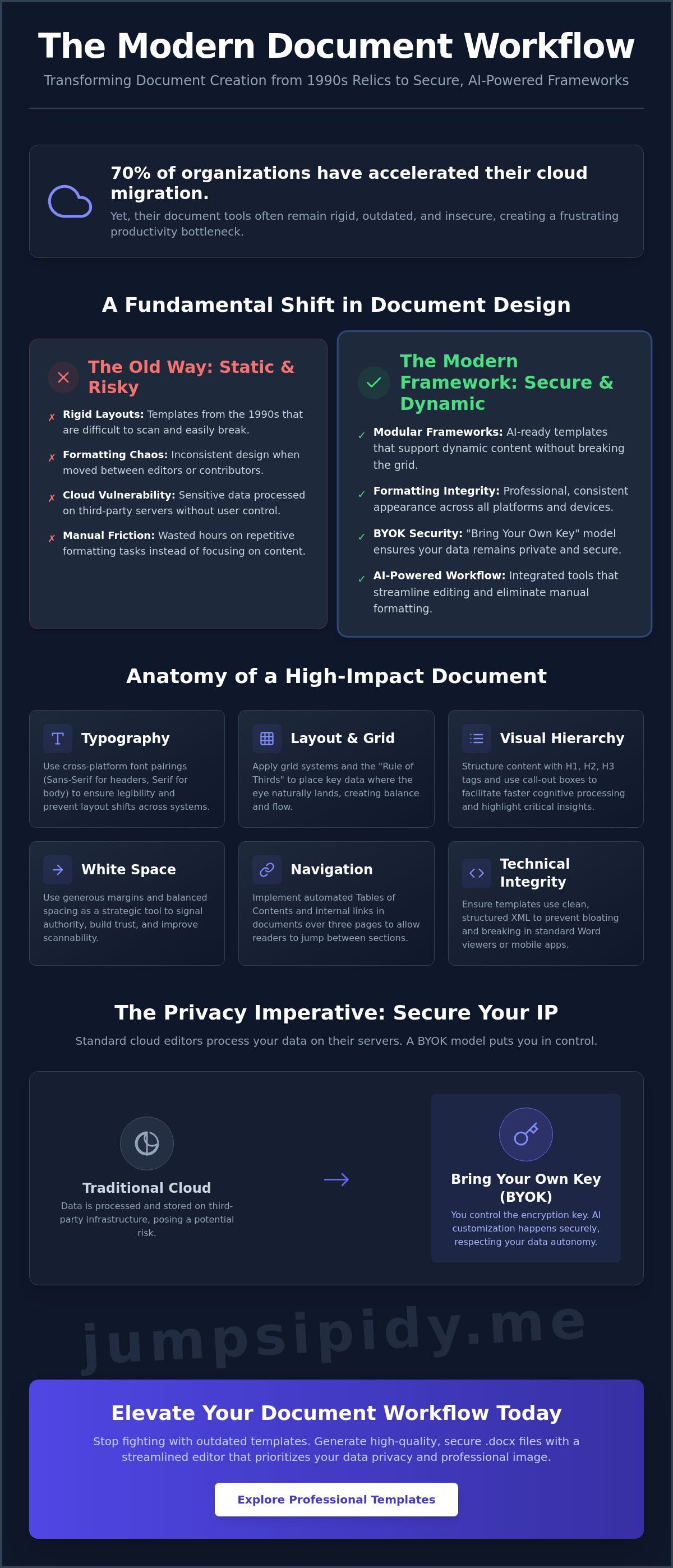
70% of organizations have accelerated their migration to the cloud as of 2026, yet many still struggle with tools that feel like relics of the 1990s. You've likely felt the frustration of downloading word document design templates only to find they're rigid, outdated, or break the moment you move them between editors. It's a common struggle to find the right balance between a sophisticated aesthetic and a functional, secure workflow that respects your data autonomy.
You deserve full control over your digital environment without sacrificing professional polish. This guide shows you how to select and customize high-performance .docx templates using privacy-first AI tools. We'll explore the shift toward "thoughtful maximalism" in 2026, how to maintain formatting integrity, and how to utilize Bring Your Own Key (BYOK) models to keep your sensitive data secure. It's time to move beyond stiff corporate memos and build a streamlined, secure document workflow that puts you back in the center of the experience.
Key Takeaways
- Learn to transition from static layouts to modular, AI-ready frameworks that support dynamic content and functional aesthetics.
- Apply the Rule of Thirds and select cross-platform typography to ensure your document remains legible and professional across all systems.
- Secure your intellectual property by utilizing a Bring Your Own Key (BYOK) model for AI customization rather than traditional cloud editors.
- Optimize your workflow by selecting professional word document design templates and editing them via an integrated AI sidebar.
- Generate high-quality .docx files using a streamlined editor that prioritizes data privacy and eliminates the need for cloud storage.
Beyond the Blank Page: Why Word Document Design Templates Matter in 2026
Starting with a blank document is a liability. It invites decision fatigue and inconsistent formatting. Modern word document design templates act as a structural framework for professional communication. They ensure every element, from the header to the footer, serves a specific functional purpose. In 2026, we've moved past static layouts. We now use AI-ready frameworks that support modular content. These systems allow you to swap sections or update data without destroying the underlying grid. Understanding the history of Microsoft Word clarifies why we've moved from basic text processing to sophisticated information architecture.
Visual hierarchy isn't just about looking good. It's about executive decision-making. When a report uses clear headings and logical spacing, the reader absorbs key data faster and with less effort. Standard Word documents often look like 1990s memos. They're cluttered, dense, and difficult to scan. Modern business environments prefer a minimalist aesthetic. This approach prioritizes clarity over decoration. It reflects a brand that values the reader's time and intelligence. High-quality word document design templates provide this professional edge immediately.
The Psychology of Document Design
White space is a tool, not empty space. It signals authority and confidence. When you use generous margins and balanced typography, you build trust with your audience. Consistent branding across a multi-page .docx file reinforces this professional image. Busy designs fail in technical summaries. They hide the core message behind a wall of visual noise. Use high-contrast color palettes and bold typography to improve legibility on screens. This is essential as more organizations migrate to digital-first workflows.
Templates as Productivity Multipliers
Templates eliminate start-up friction. You don't need to manually set font sizes or paragraph spacing every time you open a file. Pre-defined styles and headers allow you to focus on the content itself. This ensures consistency across team-produced documentation. Whether one person or ten contribute, the final report looks unified and cohesive. A design template is a modular blueprint for information architecture. It creates a predictable environment for both the human writer and the AI tools used to refine the text. By removing the need for manual formatting, you reclaim hours of billable time.
Anatomy of a High-Impact Document: Essential Design Elements
High-quality word document design templates aren't just collections of colors and shapes. They're engineered systems for information delivery. Start with typography. Choose font pairings that exist across both Windows and Mac environments to prevent layout shifts. A bold sans-serif for headings paired with a legible serif for body text creates immediate visual contrast. This improves reading speed and reduces cognitive load. Accessibility is also a priority. Ensure your font sizes and line spacing meet modern legibility standards for both digital and print viewing.
Effective layout relies on grid systems and the "Rule of Thirds." Don't center every element. Instead, place key data where the eye naturally lands to create a sense of balance and flow. These U.S. Web Design System principles emphasize making design choices that earn trust through clarity. In a .docx file, trust is built through professional spacing and consistent alignment. Use accent colors sparingly. A single brand color for borders or icons guides the reader's eye without distracting from the primary text. Navigation is the final piece of the puzzle. Every document over three pages needs an automated Table of Contents. Use interactive internal links to allow readers to jump between sections instantly.
Mastering Visual Hierarchy
Structure your content with H1, H2, and H3 tags. These aren't just organizational tools; they facilitate faster cognitive processing by signaling the importance of each section. Use call-out boxes and pull quotes to highlight critical insights or data points. Break up long, dense paragraphs with bulleted lists. This increases scannability, which is vital for executive summaries and technical reports. If you want to see how these elements look in practice, you can use a free DOCX editor to test different layout configurations.
Technical Integrity of .docx Templates
Many templates break because their underlying XML code is bloated or poorly structured. Over-designed files with excessive floating objects often fail in standard Word viewers or mobile apps. Stick to clean, minimalist structures. This ensures your formatting stays intact when you share the file with external partners. Avoid "broken" formatting by using styles instead of manual overrides. Clean code results in a smaller file size and a more responsive editing experience. A template should be a reliable instrument, not a fragile decoration that collapses under minor edits.
The Privacy Trade-off: Cloud Templates vs. Secure BYOK Editing
While aesthetics define the first impression, the infrastructure of your word document design templates determines your data security. Many free cloud-based editors harvest your content to train their proprietary models. This is a significant risk for sensitive corporate reports or legal briefs. By adhering to the core principles of document design, you can maintain professional layouts without sacrificing autonomy. Choosing a local-first workflow ensures your information stays within your control. You don't have to trade privacy for a polished .docx file.
Shift the ownership of your workflow by adopting the Bring Your Own Key (BYOK) model. This approach is the gold standard for document privacy in 2026. Instead of trusting a third-party provider with your data, you provide the connection to your own AI resources. This prevents providers from training on your business intelligence. Local-first editing ensures that the drafting process happens in your browser environment, not on a remote server. It's a proactive stance against data leaks and unauthorized access.
Flexibility is a core requirement for modern professionals. You aren't locked into a single provider's ecosystem. You can switch between models like GPT-4o or Claude 3.5 within the same design framework as your project requirements evolve. This modularity allows you to use the best tool for the specific task, whether it's summarizing a technical report or drafting a proposal. High-performance word document design templates should support this level of technical freedom.
Why Your API Key Matters
Using your own API key gives you direct control over AI costs. You pay only for the tokens you actually consume at the source. This eliminates the hidden markups found in managed AI subscriptions. It also removes the risk of third-party data retention. A no-upload advantage keeps your files in your local browser environment. Your data is never stored on a centralized server where it could be vulnerable to breaches or internal misuse. It's a cleaner, more secure way to work.
Security Standards for Professional Docs
Identify editors that respect the .docx standard without "phoning home" for every minor edit. Many traditional word processors rely on unverified AI add-ins that can be security holes. These plugins often leak data to unknown servers without your explicit consent. Inkwell's approach is different. It provides a browser-based editor that treats privacy as a functional requirement. It acts as a transparent bridge between your local files and your chosen AI, ensuring your technical integrity remains intact from start to finish.
Workflow Hack: Customizing Design Templates with Integrated AI
Select a template based on your specific document intent. A Standard Operating Procedure (SOP) requires a different structural hierarchy than a project proposal. Once you've chosen from your library of word document design templates, the next step is populating it with meaningful data. This is where most users get stuck. Traditional workflows involve hours of manual copy-pasting and reformatting. Integrated AI simplifies this transition from placeholder text to a final draft by working directly within the document grid.
Connect your preferred AI model through an integrated sidebar using your own API key. This bypasses the need for expensive monthly subscriptions while giving you the same power. Use the AI to transform generic "lorem ipsum" placeholders into structured business content. You can prompt the AI to summarize a five-page draft into a one-page executive summary that fits perfectly within your template's constraints. You can start this process immediately with a DOCX free editor that integrates directly with your chosen AI models.
AI-Assisted Content Refactoring
AI-assisted refactoring allows you to translate complex sections into multiple languages without losing your grid alignment. If your technical team provides dense jargon, use the AI to rewrite it for executive-level readability. This ensures the message lands without breaking the visual flow. Maintaining a consistent tone across different modules is vital for professional documents. Use the AI to check that the introduction matches the conclusion in style and voice, ensuring a unified brand experience throughout the .docx file.
Maintaining Design Integrity During Edits
Design integrity is often lost when AI generates too much text. To prevent this, give the AI specific character or word counts. If a section overflows, prompt the AI to "condense while maintaining key facts." It's an iterative process. Prompt, review, and make manual adjustments to ensure the visual balance remains professional. This keeps the underlying XML structure clean. It also ensures your word document design templates remain compatible across different platforms. Avoid the temptation to let the AI "hallucinate" new layout elements. Stick to the pre-defined styles to ensure the document remains stable and readable for all recipients.
Elevate Your Output with Inkwell’s Professional Template Library
Professionalism in 2026 isn't defined by visual clutter. It's defined by clarity, speed, and technical integrity. Inkwell’s collection of word document design templates follows a "tools-not-toys" philosophy. We prioritize functional honesty over marketing hyperbole. This minimalist approach ensures your content remains the primary focus. It treats the reader as a capable partner rather than a passive consumer. By removing unnecessary adjectives and bloated design elements, we provide a streamlined user interface that stays out of your way so you can work.
The technical architecture of the Inkwell editor reflects this commitment to user autonomy. It's a browser-based utility that requires no installation and avoids mandatory cloud storage. This is a deliberate design choice. It allows you to maintain full ownership of your digital environment. You can import external .docx files or select from our library. Once your file is open, the integrated AI sidebar enables you to refine text using your own API resources. This "unbundled" approach differentiates Inkwell from restrictive, all-in-one platforms that prioritize data gathering over user freedom.
Featured Template Categories
- Technical Documentation: These templates provide clean, grid-based layouts specifically for developers and system architects. They emphasize readability for complex data structures and technical specifications.
- Business Strategy: We offer structured frameworks for startups and corporate planning. These designs prioritize visual hierarchy to help executives and stakeholders absorb key insights quickly.
- SOPs and Legal: These are precision-focused templates. Every margin and header is set to maintain consistency in high-stakes environments where technical integrity is non-negotiable.
Getting Started with Inkwell
Launch the editor in your browser to begin. Set up your BYOK AI sidebar by providing your own API key. This setup takes seconds and gives you immediate access to our library of word document design templates. From there, you can begin customizing your project with the confidence that your data remains private and secure. You don't need to navigate complex menus or manage heavy software installations. Just open the tool, select your framework, and start building.
Experience the future of secure document design with Inkwell.
Take Control of Your Document Architecture
The shift toward functional aesthetics in 2026 demands more than just a clean layout. It requires a fundamental change in how you approach document structure and data privacy. By prioritizing visual hierarchy and modular frameworks, you transform basic text into an authoritative instrument of communication. Effective word document design templates are no longer static files; they're dynamic environments that respect your time and your intelligence. You've seen how typography and grid systems influence readability, and now you have the framework to apply those principles yourself.
Security remains the non-negotiable foundation of this workflow. Adopting a privacy-first BYOK model ensures that your business intelligence stays under your control, preventing third-party providers from training on your sensitive data. You don't have to sacrifice professional polish for technical integrity. A free browser-based .docx editor provides the agility you need to iterate quickly without the friction of heavy installations or cloud storage risks. This approach treats you as a capable partner in your own digital environment.
Start designing your next document with Inkwell's secure AI editor. You have the tools to build a streamlined, secure, and high-performance workflow. Take ownership of your output today and let your documents reflect the precision and professionalism of your work.
Frequently Asked Questions
Are Word document design templates compatible with all versions of Microsoft Word?
Most modern .docx files work across different platforms, but specific version requirements exist for full functionality. As of July 13, 2026, Office 2019 for Mac has entered a "reduced functionality mode" due to an expiring certificate. To maintain full editing capabilities for your word document design templates, you'll need version 16.83 or later. This usually requires updating your operating system to macOS Monterey or a more recent release.
What is a BYOK AI editor and why is it better for document templates?
A BYOK (Bring Your Own Key) editor is a utility that connects directly to your personal AI API resources. It's superior because it shifts the ownership of data security from the service provider to the individual user. You maintain full control over your encryption keys and AI costs without paying for managed subscription markups. This model ensures your document frameworks remain secure and private within your own local environment.
How do I customize a .docx template without messing up the formatting?
Use the Styles pane to manage all text changes instead of using manual formatting overrides. Manual adjustments like extra line breaks or local font size changes often break the underlying grid of word document design templates. By applying pre-defined Styles, you ensure the document adjusts its spacing and alignment automatically. This maintains the visual flow and technical integrity even when you significantly expand or condense specific sections.
Can I use AI to fill out a business template securely?
You can fill out templates securely if you choose a tool that operates on a "Zero Trust" model. This architecture ensures the editor doesn't store your data on its own centralized servers. When you use a BYOK connection, your content travels through your own encrypted channel directly to the AI provider. This setup prevents unauthorized access and keeps your sensitive business data within your controlled digital ecosystem at all times.
What are the best font choices for professional document templates in 2026?
Professional templates in 2026 prioritize high-contrast color palettes and bold, accessible typography for better on-screen legibility. Choose system-standard fonts like Inter for headers to ensure they render correctly on every device. Pair these with a classic, readable serif like Georgia for the body text. This combination improves reading speed and reduces eye strain. Avoid over-designed typefaces that might fail to load in standard Word viewers or mobile apps.
Is it better to use a cloud-based editor like Canva or a .docx editor for business reports?
A .docx editor is better for business reports because it produces a standardized, portable file with a clean XML structure. Cloud-only tools often use proprietary formats that are difficult to edit or archive once they're exported. A dedicated .docx editor maintains technical integrity and allows for precise information architecture. It also provides a more secure environment for sensitive data when combined with local-first editing and BYOK AI integrations.
How can I avoid my data being used to train AI when using document templates?
Avoid all-in-one AI platforms that include data-sharing clauses in their terms of service. Instead, use a "no-upload" editor that connects to AI models via your own private API key. This prevents your files from being stored on external servers where they could be harvested for model training. By keeping your documents in a local browser environment, you ensure your intellectual property remains private and decentralized.
Do I need a subscription to use Inkwell's AI-powered editor?
You don't need a subscription to use Inkwell's AI-powered editor. It's a free tool that acts as a transparent bridge between your local files and your chosen AI resources. You only pay your AI provider directly for the tokens you actually consume using your own API key. This model eliminates unnecessary monthly overhead. It gives you full autonomy over your document design expenses and your data privacy.