

Most AI writing assistants are excellent at drafting emails, but they're surprisingly bad at handling a fifty-page technical manual without destroying every table and header in sight. You've likely felt the frustration of pasting a formatted document into a chat window, only to receive a messy block of text that requires hours of manual cleanup. If you're searching for an ai tool to refactor docx files, you've probably also encountered high monthly subscriptions for tools you rarely use and privacy policies that make you uneasy about uploading sensitive company data.
Document refactoring is a structural engineering task, not just a writing task. You deserve a workflow that treats document integrity as a priority. This guide shows you how to restructure and clean complex Word documents using AI while maintaining full control over your data and costs. We'll explore how to achieve a clean, logically structured file through a browser-based interface that eliminates software bloat and respects your digital autonomy.
We'll walk through the process of refactoring your files while maintaining total control over the AI model you use. You'll learn how to leverage a Bring Your Own Key approach to ensure your work stays private and your overhead remains low. It's time to stop fighting with your editor and start using a tool designed for professionals who value functional honesty and technical precision.
Key Takeaways
- Differentiate between simple text editing and structural document refactoring to improve clarity without altering core meaning.
- Maintain the integrity of your XML schema and heading hierarchies by choosing a specialized ai tool to refactor docx files.
- Protect sensitive business data with a "No Upload" philosophy that keeps your documents within the secure browser environment.
- Reduce overhead costs using the Bring Your Own Key (BYOK) model to pay only for the AI processing you actually use.
- Streamline your workflow with a minimalist, browser-based editor that connects directly to your preferred AI model via API.
What is .DOCX Refactoring and Why Does it Require AI?
Refactoring is a concept borrowed from software engineering. It describes the process of restructuring existing code to improve its internal logic without changing its external behavior. When applied to professional writing, refactoring focuses on optimizing the internal structure, logical flow, and information density of a document. It isn't about changing your core message. It's about making that message more accessible and technically sound. A professional ai tool to refactor docx treats your document as a structured data set rather than a simple string of text.
Standard tasks like summarizing or rewriting are surface-level. They often ignore the complex Office Open XML format that powers modern Word files. Effective refactoring requires an understanding of how different sections relate to one another. It demands a tool that can navigate heading hierarchies and cross-references without breaking the underlying XML schema. This is where an AI integrated sidebar becomes essential. It provides a contextual layer that allows you to apply improvements to specific sections while maintaining the integrity of the entire document.
The Difference Between Editing and Refactoring
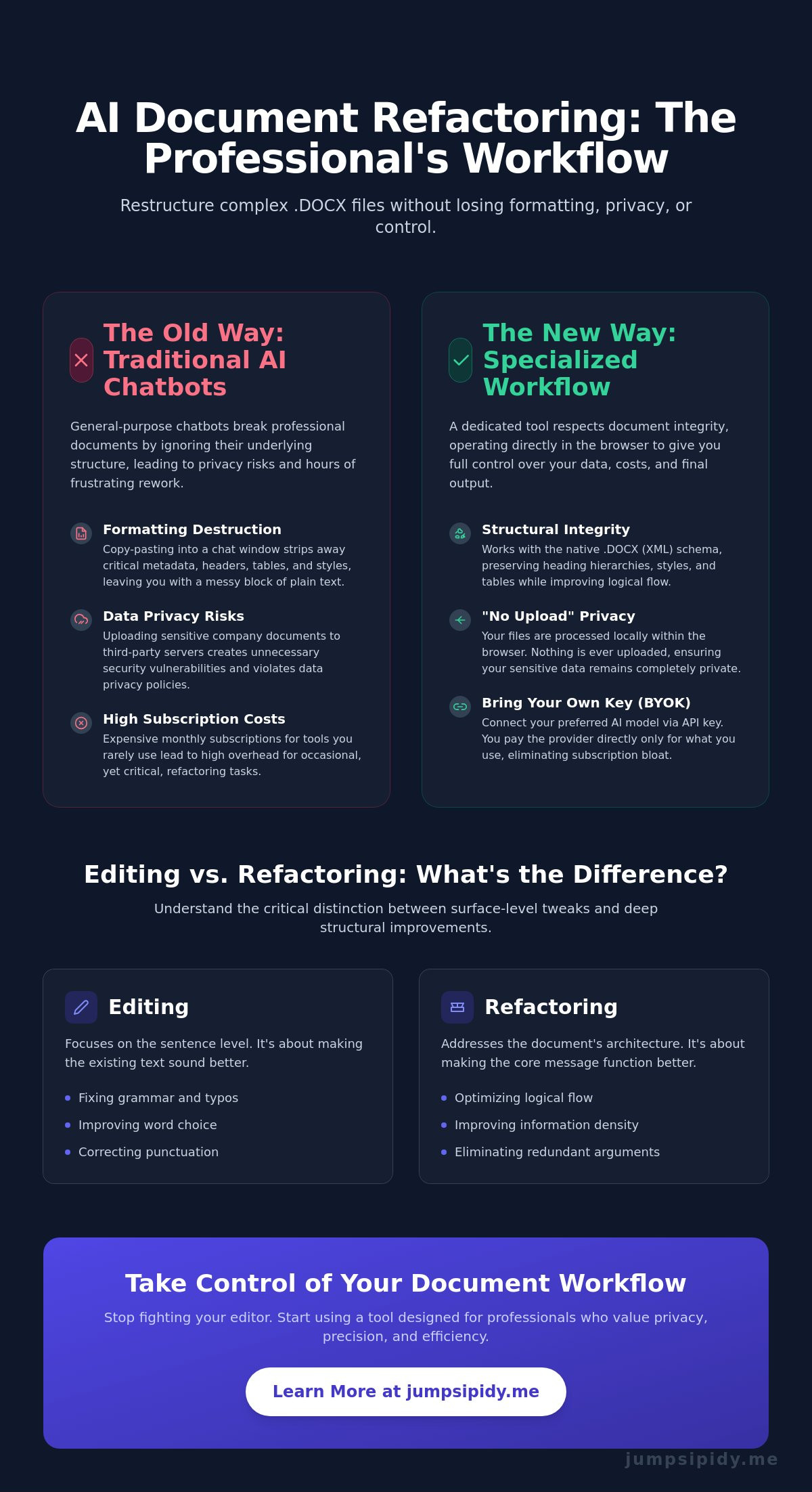
Traditional editing usually happens at the sentence level. You fix a comma or swap a word for a better synonym. Refactoring addresses the architecture of the prose. It identifies "code smells" in your writing, such as circular logic, redundant arguments, or weak transitions between paragraphs. While an editor makes a sentence sound better, refactoring ensures the document functions better as a piece of communication. AI enables this by scanning for patterns that are difficult for human eyes to track across long-form content.
Why Traditional AI Chatbots Fail at .DOCX Refactoring
General-purpose chatbots rely on a copy-paste workflow that is fundamentally broken for professional use. When you paste text into a chat window, you strip away the metadata, styles, and headers that define a .docx file. You're left with a plain text block that requires hours of manual re-formatting once the AI is done. Most chatbots also struggle with context window limitations. They lose the thread of a fifty-page document halfway through. A professional ai tool to refactor docx avoids these pitfalls by working within a browser-based editor. This approach allows the AI to read the file natively, preserving your formatting while you restructure the content.
How AI Restructures Complex Documents Without Losing Formatting
Modern document processing often fails because it treats .docx files as flat text. A sophisticated ai tool to refactor docx operates differently. It interacts directly with the underlying XML schema. This ensures that when the AI suggests a structural change, it doesn't break your margins, font styles, or paragraph spacing. It preserves the document's containers while refining the content inside them. This level of technical precision allows you to rebuild a document's logic without rebuilding its layout from scratch.
Professional documents often suffer from technical drift. This happens when the language becomes so specialized that it loses its impact on decision makers. AI refactoring bridges this gap. It rewrites complex sections for executive-level readability while maintaining the accuracy of the underlying data. It also automates the creation of professional transitions between disparate sections. This ensures your technical manual or business proposal reads like a cohesive narrative rather than a collection of isolated notes. As businesses look for ways to proactively manage customers' sensitive data, choosing a tool that respects these structural boundaries becomes a matter of both security and efficiency.
Heading Hierarchy and Logical Flow
AI identifies the logical skeleton of your work. It synchronizes heading hierarchies from H1 down to H4, creating a predictable navigation experience for the reader. If a section is too dense, the AI can suggest converting long paragraphs into digestible bulleted lists or structured tables. It also enforces consistent terminology throughout a 50+ page document. If you use "User Interface" in chapter one, the AI ensures you don't switch to "GUI" in chapter ten. This level of consistency is nearly impossible to maintain manually in high-volume files.
The Role of Specialized Document Templates
Templates serve as a baseline for the AI. They provide a pre-defined structure that helps the model understand the document's intended goal. Whether you're drafting a technical spec or a project roadmap, a template sets the boundaries. Inkwell combines these professional document templates with AI flexibility. This dual approach ensures your refactored file is both logically sound and visually professional. By using a template as a guide, the AI can more accurately suggest where to expand on details or where to prune redundant information to maintain a clean, minimalist flow.
Privacy and Cost: The BYOK Advantage for Document Refactoring
Decentralization is the core of digital autonomy. When you use an ai tool to refactor docx files, you shouldn't have to surrender your data to a third-party cloud. The Bring Your Own Key (BYOK) model changes the power dynamic. You provide the API key from your preferred provider, such as OpenAI or Anthropic. This creates a direct connection between your document and the model. There is no middleman collecting a markup or, worse, your sensitive information. You retain ownership of the process from start to finish.
Transparency is another critical factor in professional workflows. Most platforms hide the specific model they use behind vague marketing terms. With a BYOK setup, you know exactly which engine is refactoring your text. You might choose GPT-4o for high-reasoning tasks or Claude 3.5 for nuanced creative flow. You're in charge of the technical architecture of your workflow. This modularity ensures that as AI models improve, your document editor evolves with them instantly.
Securing Sensitive Data in the AI Era
Traditional AI platforms require you to upload files to their servers. This creates a permanent digital footprint that many legal and medical professionals simply can't afford. A browser-based editor keeps your document local. It processes the text section-by-section through the API, ensuring your file never lives on a third-party server. This "No Upload" philosophy prevents your private business documents from ending up in public training datasets. It's client-side processing designed for high-stakes documentation where privacy isn't optional.
Controlling Your AI Spend
Subscription fatigue is a real drain on professional resources. You shouldn't pay a flat monthly fee for an ai tool to refactor docx if you only use it for a few projects a month. BYOK eliminates the "middleman tax" that many document tools charge. You pay the AI provider directly for the tokens you consume. This pay-as-you-go model is significantly more efficient. You can use cheaper, faster models for initial structural drafts. When you're ready for the final polish, switch to a high-reasoning model for the final refactor. You control the cost and the quality at every step.
5 Steps to Refactor Your Word Document Using AI
Refactoring a complex document doesn't have to be an overwhelming task. It's a methodical process that rewards a structured approach. By following a logical workflow, you can transform a messy draft into a professional asset that communicates your ideas with technical precision. Using an ai tool to refactor docx allows you to focus on high-level logic while the technology handles the structural heavy lifting. It's about working smarter, not just faster.
- Import your file: Open your existing .docx file directly in a browser-based editor. This avoids software bloat and keeps your workspace clean.
- Connect your API key: Use the BYOK model to link your preferred AI provider. This ensures you're using the specific model that fits your project's needs.
- Target specific sections: Select logical blocks of text for analysis. Don't feel pressured to refactor the entire document at once.
- Apply refactoring prompts: Use precise commands. Instead of "make it better," try "standardize tone for a technical audience" or "restructure for executive clarity."
- Export your work: Save the refactored document. A professional tool ensures your original XML formatting remains intact throughout the process.
Setting Up Your AI Refactoring Environment
Choosing the right provider is the first step in creating a high-performance workflow. Different models excel at different tasks. Some are better at technical density, while others prioritize conversational flow. Configure your sidebar with prompts that match your document type. A minimalist UI is essential here. It prevents distraction bloat and keeps the focus on your prose. You're building a laboratory for your ideas, so keep the tools sharp and the interface lean.
Iterative Refactoring: The Pro Workflow
Pro users rarely refactor a 50-page document in a single pass. It's more effective to work section by section. This allows you to review AI suggestions in real-time and maintain total control over the narrative. You can verify that the AI respects your heading hierarchies and terminology before moving to the next segment. Finalize the structure by integrating professional templates. This ensures the end result is both logically sound and visually consistent. Start your next project with our DOCX FREE EDITOR to see this workflow in action.
Choosing the right ai tool to refactor docx simplifies these complex tasks. It bridges the gap between raw AI power and the practical requirements of professional document standards. When you control the environment, the prompts, and the data, you turn AI into a reliable instrument for structural excellence.
Inkwell: The Minimalist AI Tool for Professional DOCX Refactoring
Inkwell is designed for users who value efficiency and privacy. It functions as a sophisticated bridge between raw AI models and your professional documents. As an ai tool to refactor docx, it prioritizes technical integrity over marketing fluff. You don't need to install heavy software or manage another cloud subscription. It's a browser-based environment that respects your intelligence and your time.
The core of the experience is the integrated AI sidebar. This interface allows you to perform complex restructuring tasks without leaving the editor. You can connect your own API keys to access the models you trust. This BYOK architecture ensures that your data remains under your control at all times. Inkwell operates on a "No Upload" philosophy. Your documents are processed locally in your browser. This is a critical requirement for handling sensitive company information that cannot be stored on third-party servers.
Why Professionals Choose Inkwell
Professionals choose Inkwell because it eliminates the unnecessary friction found in traditional document editors. You don't pay for a managed AI subscription you might only use occasionally. Instead, you use your own API keys and pay only for the tokens consumed during the refactoring process. This model provides total transparency regarding both cost and the specific technology being used for your work.
The platform offers full .docx compatibility without the resource overhead of legacy word processors. It follows a "tools-not-toys" philosophy. Every feature is built to facilitate serious document work, from technical manuals to legal briefs. You can also access professional document templates to jumpstart your refactoring process. These templates provide the structural baseline the AI needs to organize your content effectively and consistently.
Getting Started with Free In-Browser Editing
Setting up your workspace is immediate. You can open your first document in Inkwell in under 10 seconds. There are no account hurdles or lengthy onboarding sequences to slow you down. Once your file is open, the AI sidebar is ready to assist with instant rewriting and structural analysis. You can start with the DOCX FREE EDITOR to experience a streamlined, minimalist workflow today.
Navigating the sidebar is intuitive and logical. You simply select a block of text and apply your refactoring prompts. The AI handles the logic, while Inkwell ensures your formatting stays consistent throughout the file. It's a high-performance instrument that stays out of your way so you can finish your work. If you're ready to take control of your document architecture, start refactoring your documents for free with Inkwell.
Master Your Document Architecture
Structural document editing is no longer a manual burden. By separating the writing from the engineering of the file, you ensure both clarity and technical precision. You've learned how to maintain XML integrity and use specialized templates to guide AI through complex tasks without losing control over your data or your budget. The transition from messy drafts to professional assets is now a logical, step-by-step process that respects your time and your intelligence.
Finding the right ai tool to refactor docx means looking for a solution that respects your privacy and your existing workflows. Inkwell provides a 100% browser-based environment with no software to install. Because of our privacy-first design, we never see your document data. Our BYOK model allows you to use your own OpenAI or Anthropic keys; this ensures you pay only for what you use while maintaining total model transparency. You're no longer a passive consumer of AI services but a capable partner in your digital environment.
Take ownership of your professional documentation today. Refactor your DOCX files for free with Inkwell. Efficiency and functional honesty are now within your immediate reach. Build better documents with a tool designed for experts.
Frequently Asked Questions
What is the best AI tool to refactor a Word document?
Inkwell is the premier option for professionals who need a specialized ai tool to refactor docx files. It combines a browser-based editor with a technical AI sidebar. Unlike general chatbots, it handles the file's internal structure natively. This allows for deep structural changes while keeping your original XML schema intact. It's a specialized utility for those who need technical precision without the bloat of managed subscriptions.
Is it safe to use AI for refactoring sensitive business documents?
Safety depends on the tool's architecture. Inkwell uses a "No Upload" philosophy. Your documents stay in your browser and aren't stored on external servers. By using your own API key, you ensure that your data isn't used to train public models. This client-side processing is essential for legal or corporate documentation where data leaks are a non-negotiable risk.
Can AI maintain .docx formatting while restructuring text?
Yes, provided you use an ai tool to refactor docx that interacts directly with the file's XML nodes. General AI interfaces often strip formatting when you copy and paste. Specialized editors like Inkwell preserve your styles, margins, and headers while the AI analyzes the prose. This technical bridge ensures that structural improvements don't result in a broken layout that requires hours of manual re-formatting.
What does BYOK mean in the context of AI writing tools?
BYOK stands for "Bring Your Own Key." It means you connect your own API account from providers like OpenAI or Anthropic directly to the editor. This gives you decentralized control over your AI usage. You pay the provider directly for tokens used rather than paying a marked-up monthly subscription fee to a middleman platform. It's a transparent, cost-effective model for professional users who value autonomy.
How do I use ChatGPT to refactor a .docx file without uploading it?
You can't use the standard ChatGPT web interface without uploading the file to OpenAI's servers. To maintain privacy, use a browser-based interface like Inkwell. It acts as a secure bridge. You paste your API key, and the AI processes your text section by section within the local editor environment. This method keeps your full document off the cloud while still leveraging the reasoning power of GPT-4o.
Do I need a subscription to use an AI document refactoring tool?
Not with Inkwell. We offer a DOCX FREE EDITOR that allows you to open and edit files in your browser at no cost. For AI features, you simply connect your own API key. This pay-as-you-go approach eliminates subscription fatigue. You only pay the AI provider for the specific work you perform. It's a flexible solution for teams that don't need another recurring monthly expense.
Can AI help with Standard Operating Procedure (SOP) refactoring?
AI is highly effective for SOP work. It identifies circular logic, redundant steps, and inconsistent terminology across long procedures. By refactoring an SOP, the AI helps you standardize the tone and ensure the instructions are logically sequenced. Using professional templates alongside AI refactoring ensures your procedures meet industry standards for clarity and technical accuracy without manual structural re-ordering.
What is the difference between AI rewriting and AI refactoring?
Rewriting focuses on the surface level of the prose, such as changing tone or fixing grammar. Refactoring addresses the document's architecture. It involves re-organizing heading hierarchies, improving logical transitions between sections, and optimizing information density. While rewriting makes a sentence sound better, refactoring ensures the entire document functions as a logical, cohesive piece of technical communication.