Every time you upload a sensitive document to a "free" translation site, you're likely trading your data privacy for a poorly formatted output. It's a common frustration when you need to translate docx files online quickly. You expect a seamless transition between languages; however, you often end up with broken layouts and the nagging fear that your information is now training someone else's AI model.
You shouldn't have to choose between professional security and a functional document. We know that maintaining the precise structure of your Word files is just as important as the accuracy of the text itself. This guide shows you how to bypass traditional "black box" services. You'll learn how to use modern AI workflows to achieve instant, high-quality translations while keeping your data entirely under your control.
We'll walk through the process of using browser-based AI editors to handle complex DOCX files without losing a single margin or font style. You'll discover how to minimize costs by using your own API resources and ensure that your private documents stay private. It's time to take ownership of your digital environment.
Key Takeaways
- Transition from basic machine translation to contextual AI restructuring to ensure your translated documents read naturally and maintain technical accuracy.
- Implement a Bring Your Own Key (BYOK) workflow to gain total control over your data and avoid the high costs of fixed monthly subscriptions.
- Master the process to translate docx files online instantly while maintaining precise document layouts, margins, and font styles.
- Leverage browser-based editors to manage sensitive information locally without risking privacy on public, data-gathering platforms.
- Use integrated AI sidebars to connect your own API keys for a customized, high-performance translation experience tailored to your specific project needs.
What is Online DOCX Translation in 2026?
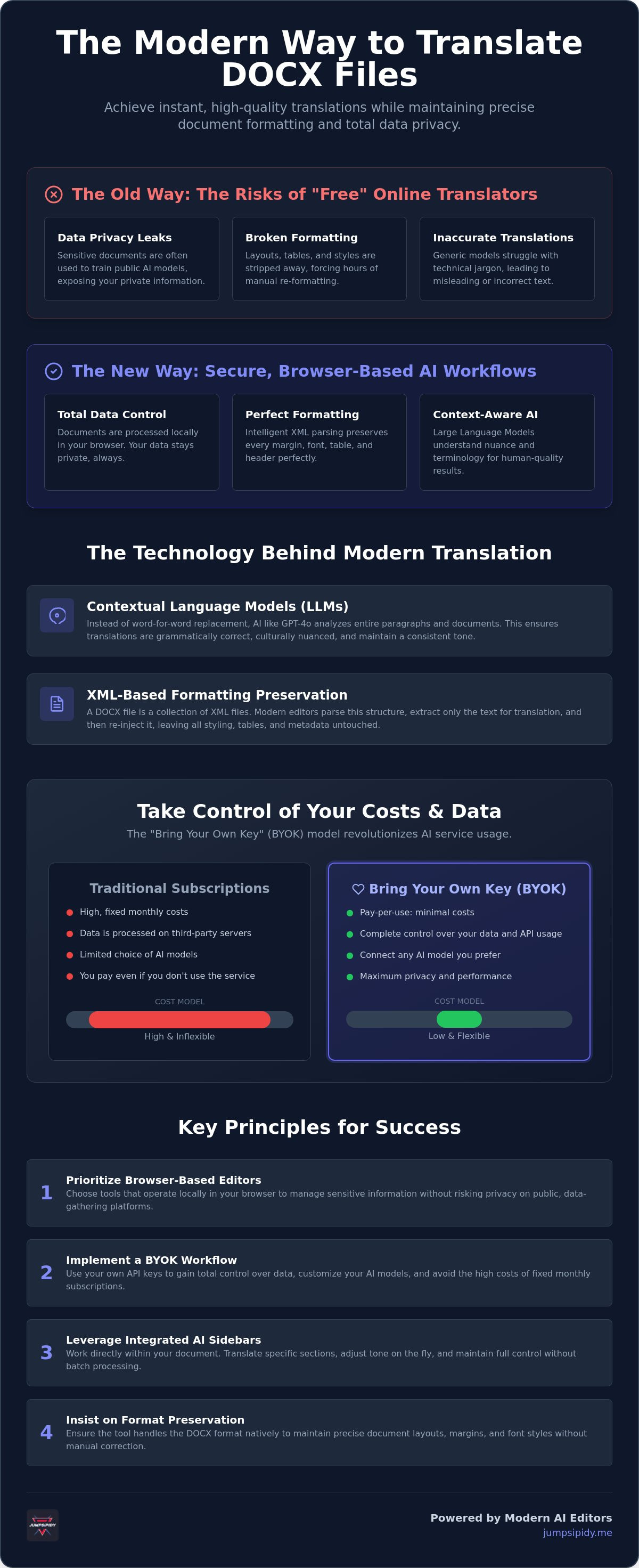
In 2026, the ability to translate docx files online has evolved from a simple text replacement exercise into a sophisticated architectural feat. Modern translation no longer relies on rigid, word-for-word databases. Instead, it utilizes Large Language Models (LLMs) that treat your document as a cohesive entity rather than a string of isolated sentences. This shift represents the core of The Technology Behind Modern Document Translation. Instead of merely swapping vocabulary, these systems analyze the surrounding context, cultural nuances, and industry-specific terminology to provide a result that feels human-authored.
The .docx format remains the professional standard because it encapsulates more than just text. It holds metadata, complex table structures, and intricate styling that other formats often lose. However, there is a clear distinction between basic file converters and integrated AI document editors. Converters often strip away the very formatting you need to keep, forcing you to spend hours fixing broken layouts. Integrated editors allow you to work directly within the file structure. They act as a bridge, enabling the AI to process the translation while respecting the underlying XML that defines your document's appearance.
Key Benefits of Translating Documents Online
Efficiency is the primary driver for users who need to translate docx files online. Professional human services often require a turnaround time of several days; AI-driven online tools provide results in seconds. Because these tools operate directly in your browser, you don't need to install heavy software suites or manage local updates. The most significant advantage is automated formatting preservation. Modern workflows ensure your headers, footers, and tables remain exactly where they belong. This eliminates the need for manual re-formatting after the translation is complete.
Common Pitfalls to Avoid with Free Translators
Privacy is the most significant risk when using traditional free services. Many of these tools operate on a data-harvesting model. They often use your uploaded documents to train public AI models, which means your sensitive information could potentially resurface in other contexts. Accuracy limits also remain a concern. Generic models often struggle with technical, medical, or legal jargon. Without a specialized sidebar or the ability to provide specific context, these tools might produce inaccurate or misleading translations. Finally, watch out for formatting breakage. If a tool forces a conversion to a different file type before translating, the original layout rarely survives the process intact.
The Technology Behind Modern Document Translation
Modern document translation has moved beyond simple dictionary lookups. When you translate docx files online in 2026, you're interacting with neural networks that understand syntax and intent. Models like GPT-4 and Claude 3.5 don't just replace words. They restructure entire paragraphs to match the target language's grammatical logic. This process depends heavily on "context windows." A large context window allows the AI to maintain terminology consistency across a fifty-page document. It remembers how it translated a specific technical term on page one even when it reaches page forty. This ensures a cohesive voice throughout the entire file.
Formatting preservation relies on XML-based parsing. A DOCX file is essentially a collection of XML files. Sophisticated editors extract the text from these tags, process the translation, and re-inject the content. This ensures that your bold text, tables, and headers remain untouched. Unlike batch processing, which requires you to upload a file and wait for a static download, a real-time sidebar allows for granular control. You can translate specific sections or adjust the tone on the fly. If you want to experience this modularity firsthand, you can use a free AI-powered DOCX editor to manage your translations.
Choosing the Right AI Model for Your Language
GPT-4o remains the gold standard for European languages and creative marketing copy. It handles linguistic nuance and cultural idioms with high precision. For technical, medical, or legal documents, you might prefer models specialized in those specific datasets. Adjusting the "temperature" setting is also critical for accuracy. A temperature of 0 ensures literal, consistent translations. Higher settings allow for more fluid, natural-sounding prose in creative projects. Selecting the right model for the task is the first step toward a professional result.
Why Browser-Based Editors are Replacing Desktop Software
Desktop software is rapidly becoming a legacy solution. Browser-based editors offer zero-install workflows that allow for immediate productivity on any device. They provide perfect cross-platform compatibility between Windows, Mac, and Linux without versioning conflicts. These platforms integrate directly with cloud-based API keys. This modularity means you aren't locked into a single provider's ecosystem. You own the connection and the data flow. This shift empowers users to build a private, high-performance translation environment that lives entirely in the browser.
BYOK vs. Subscription: Controlling Your Translation Costs
The landscape of digital tools has shifted toward modularity. You no longer need to commit to a recurring monthly fee just to translate docx files online occasionally. The "Bring Your Own Key" (BYOK) model has revolutionized how we handle document processing by unbundling the software interface from the AI engine. Instead of paying a flat subscription to a middleman, you connect your own API key from providers like OpenAI or Anthropic. This approach ensures you pay only for the exact amount of data you process. It places the power of professional-grade translation directly in your hands without the corporate markup.
Managing your own API keys is a straightforward process. You simply visit the developer dashboard of your chosen AI provider, generate a unique key, and paste it into your editor's sidebar. This creates a direct pipeline to the most advanced models available. Traditional subscription services often charge between $8.90 and $29.90 per month, regardless of whether you translate one page or one hundred. By eliminating the intermediary, you gain access to raw compute power at a fraction of the cost. You aren't just a user; you're the administrator of your own translation workflow.
The Privacy Advantage of BYOK
Privacy is a significant concern for corporate and legal users. When you use a standard subscription platform, your documents often pass through third-party servers that might use your data for model training. BYOK changes this dynamic. It allows you to maintain a direct, encrypted relationship with the AI provider. You can configure your API settings to ensure that your sensitive information is never stored or used to train future models. This decentralized control is safer for handling confidential contracts or proprietary research documents that require absolute discretion.
Cost Transparency and Scalability
The economics of API usage are remarkably efficient. AI-driven platforms can process approximately 20,000 words for every US dollar spent. Translating a 50-page document via API might cost only a few pennies, making it far more scalable than a fixed subscription. This transparency helps you avoid the "subscription trap" where you pay for idle features. BYOK allows you to switch between different AI models instantly to optimize for either maximum accuracy or lower costs based on the specific requirements of your document.
Step-by-Step: How to Translate DOCX Files Online Instantly
Traditional translation sites often force you into a rigid "upload and wait" cycle. You lose visibility into the process and often receive a file with broken formatting. Modern workflows prioritize a direct, browser-based approach. This allows you to translate docx files online while maintaining full control over every paragraph, table, and header. By using a specialized editor, you bridge the gap between raw AI power and professional document standards.
The process is designed for speed and technical integrity. Follow these steps to get started:
- Select a browser-based editor: Use a DOCX FREE EDITOR that supports native file imports without requiring local installation.
- Connect your AI provider: Open the integrated sidebar and input your API key from OpenAI or Anthropic. This creates a private, direct link to the LLM.
- Trigger the translation: You can choose to process the entire document at once or select specific sections for a more targeted approach.
- Review in real-time: The editor displays the translated text immediately within your original layout. This allows you to spot and correct linguistic nuances as they appear.
- Export the file: Once you're satisfied with the results, save the document as a standard .docx file. The internal XML structure remains intact, ensuring compatibility with any word processor.
Preparing Your Document for Best Results
AI models perform most accurately when the source material is clean. Before you trigger the sidebar, remove unnecessary page breaks or complex floating images that might confuse the parsing engine. Use the AI prompt to define your target audience and tone. Specify if the document requires a formal, legal, or conversational style. Identifying sections with highly specific industry jargon early allows you to flag them for human-in-the-loop verification. This ensures that the AI doesn't hallucinate technical meanings.
Refining the Translation with AI Tools
Translation often alters the physical length of your text. For instance, translating from English to German can increase word count by approximately 20% to 35%. This expansion can push text into margins or break table alignments. Use the sidebar's rewrite features to condense sections that threaten your layout. This modular control ensures your document remains visually professional. If your project requires deeper structural changes, check out our guide on the best AI tool to refactor DOCX files for advanced editing techniques.
Inkwell: The Minimalist AI Word Editor for Private Translation
Inkwell provides a streamlined environment to translate docx files online without the overhead of traditional office suites. It functions as a high-performance, browser-based AI-Powered DOCX Editor. You don't need to install software or manage complex local configurations. The interface is built for utility, acting as a direct bridge between your document and the AI model of your choice. This architecture respects your intelligence and your time, allowing you to move from a raw file to a finished translation within a single, focused window.
The integrated AI sidebar is the core of this workflow. It connects directly to your free or paid BYOK resources. This setup ensures that Inkwell never acts as a "black box" for your information. Your API key remains under your control, and your documents are processed according to the specific security settings you've defined with your AI provider. It's a transparent, decentralized approach to document management that prioritizes your autonomy and data ownership. You aren't just using a tool; you're managing a private technical pipeline.
Efficiency also requires the right starting point. Inkwell provides access to professional document templates that ensure your work meets industry standards from the first page. Whether you're drafting a technical report or a legal contract, these templates maintain structural integrity even after the AI sidebar completes its translation task. You can jumpstart your projects with the confidence that the final output will remain polished and professional.
A Tools-Not-Toys Philosophy
Inkwell strips away the distractions common in modern software. There are no intrusive notifications or unnecessary features to clutter your screen. This minimalist design facilitates deep work and allows you to focus on the technical integrity of your document. You can launch the free editor and begin working in seconds. It is a tool designed for researchers, legal professionals, and writers who value precision over marketing fluff. We treat you as a capable partner who seeks total control over your digital environment.
Future-Proofing Your Document Workflow
The modular nature of this editor means you aren't locked into today's technology. As AI models advance, you simply update your API connection to access new capabilities. This ensures your workflow remains relevant without requiring a platform migration. To learn more about optimizing your setup, read our AI-powered DOCX editor: the 2026 guide to private document workflows. Take control of your data and use Inkwell to translate docx files online securely today.
Take Control of Your Document Workflow
The era of sacrificing data privacy for convenience is over. You now have the technical resources to translate docx files online without relying on restrictive, data-harvesting platforms. By leveraging the BYOK privacy model and browser-based AI editors, you maintain absolute ownership of your sensitive information while ensuring your document's formatting remains intact. We've explored how contextual AI understanding and precise XML parsing eliminate the need for manual re-formatting, saving you both time and professional frustration.
It's time to move toward a more modular and transparent digital environment. You can achieve professional results at a fraction of the cost of traditional services by utilizing your own API keys. Whether you're handling a single page or a complex technical report, our professional template library and streamlined free browser-based editor stay out of your way so you can work effectively. Start translating your DOCX files privately with Inkwell and experience a utility-first approach to document management. You have the tools; now it's time to use them.
Frequently Asked Questions
Is it safe to translate sensitive documents using online tools?
Safety depends entirely on the data model of the platform you choose. Standard free tools often harvest your content to train public AI models, which creates a significant privacy risk. Using a Bring Your Own Key (BYOK) workflow ensures your documents remain encrypted and private. This setup maintains a direct relationship between you and the AI provider, preventing third-party data storage.
Will the AI maintain the tables and images in my Word document?
Yes, provided you use an editor that utilizes XML-based parsing. This technology isolates the text for processing while leaving the structural tags for tables, images, and margins untouched. It ensures that when you translate docx files online, the visual integrity of your professional document remains exactly as it was in the original version.
How much does it cost to translate a DOCX file using an API key?
API translation is highly cost-effective, typically averaging about $1 for every 20,000 words. This pay-as-you-go model is significantly cheaper than a fixed monthly subscription for most users. You eliminate the middleman markup and only pay for the raw compute power you actually use, making it ideal for both occasional and high-volume projects.
Can I translate a DOCX file from English to any language?
Modern Large Language Models support over 100 languages, covering almost all global business and technical needs. These systems handle complex scripts and grammatical nuances for languages like Mandarin, Arabic, and Japanese with high precision. You can switch between different AI models within your editor to find the one that best handles your specific language pair.
Do I need to install Microsoft Word to use an online DOCX translator?
You don't need any local software installations to use a browser-based editor. These tools function independently of Microsoft Word and are compatible with Windows, Mac, and Linux systems. You simply import your file directly into the browser, perform the translation, and export the finished .docx file once you're satisfied with the results.
What is the difference between a file translator and an AI sidebar editor?
A file translator is a "black box" service where you upload a document and wait for a static download. An AI sidebar editor provides an interactive workspace where you can see the translation happen in real-time. This allows you to refine specific paragraphs, adjust the tone, and fix layout issues immediately without re-uploading the file.
How do I get an API key for document translation?
You can generate an API key by creating a developer account on a platform like OpenAI or Anthropic. Once your account is active, navigate to the API dashboard to create a unique secret key. You then paste this key into your editor's sidebar to establish a secure, private connection for all your future translation tasks.
Can I edit the translated document after the process is finished?
Yes, an integrated editor allows for full document manipulation after the translation is complete. You can fix phrasing, adjust font styles, or resize tables directly in the browser window. This ensures that you have a polished, professional result ready for distribution immediately after you translate docx files online and before you export the final file.